
Product
arcley: construction budget software [Features 2026]
If you want the shorter commercial version first, see the construction budget software page and the pricing page before diving into the full feature breakdown.
Budgets organised by sections and line items
The foundation of any well-structured construction budget is sections and line items. In arcley, building this structure is intuitive: add sections (Demolition, Brickwork, Installations...) and within each one, line items with their description, unit of measurement, quantity and unit price.
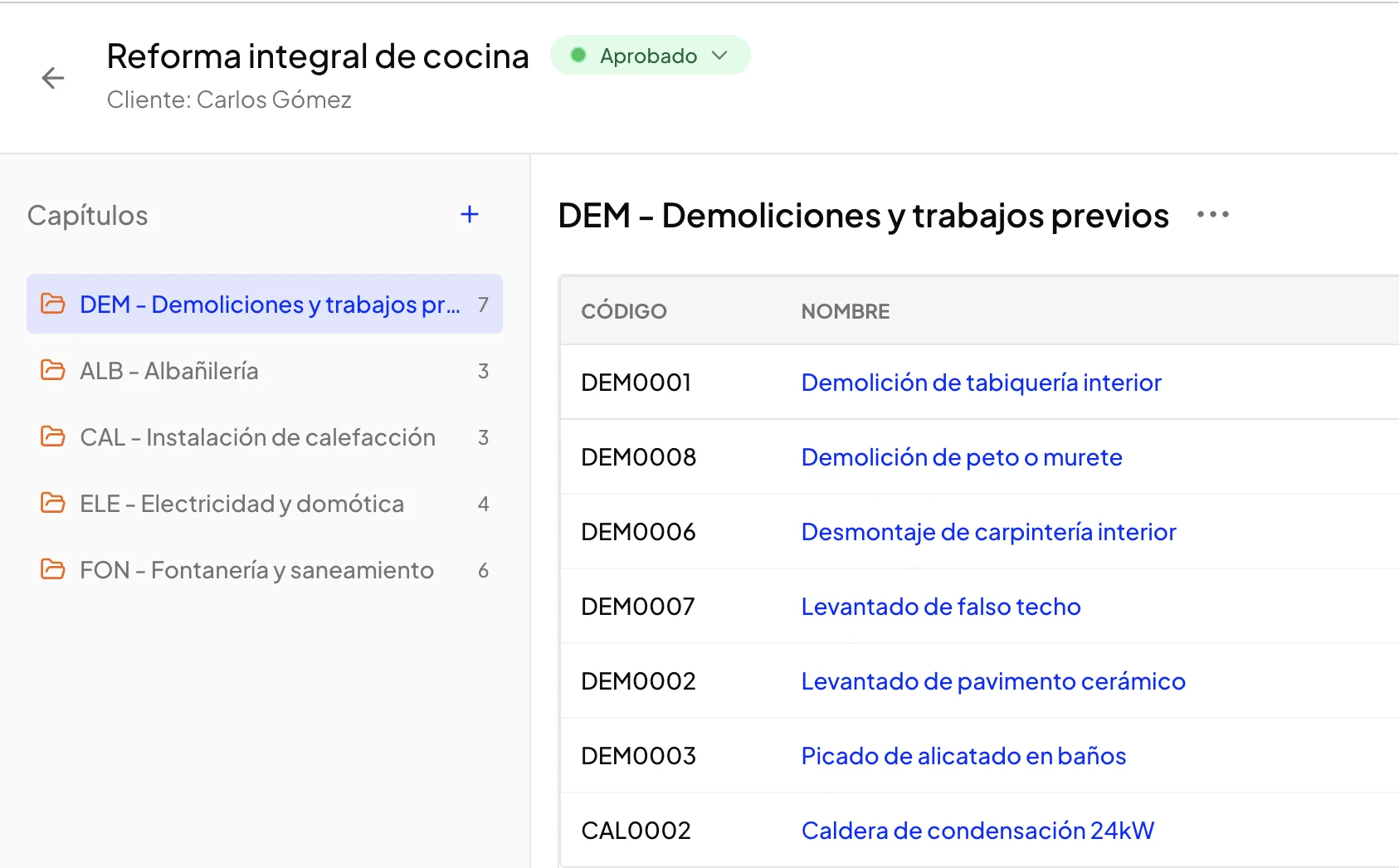
View of a budget with expanded sections and detailed line items
Totals are calculated automatically: amount per line item (quantity × price), subtotal per section and budget total. No formulas to maintain, no calculation errors.
- •Unlimited sections: organise your budget with as many sections as you need
- •Detailed line items: description, unit, quantity, unit price and amount
- •Internal notes: add comments to any item that only you see (not exported to PDF)
- •Drag and drop reordering: move sections and items by dragging
Simple budgets (quick budget, no sections needed)
Not every job needs a full section structure. Sometimes you just need to list the items and send: a one-off repair, an electrical installation, a quick quote for a client.
With arcley's simple budgets you can create a budget with just line items, no sections at all. Think of it as a pro-forma invoice: code, description, quantity, unit price and amount. Straight to the point.
- •No prior structure needed: add items directly without creating sections first
- •Same price database: autocomplete works identically to structured budgets
- •Same export options: PDF, Excel and CSV with full customisation
- •Upgradeable: add sections later if the project grows in complexity
When to use a simple budget: it is ideal for repairs, installers, independent tradespeople or any job where a section structure would be overkill. If the work fits in 5-10 lines, a simple budget is usually the fastest, cleanest option.
Price database with autocomplete
How many times have you typed the same line item in different budgets? arcley's price database saves all your items so you never have to write them again.
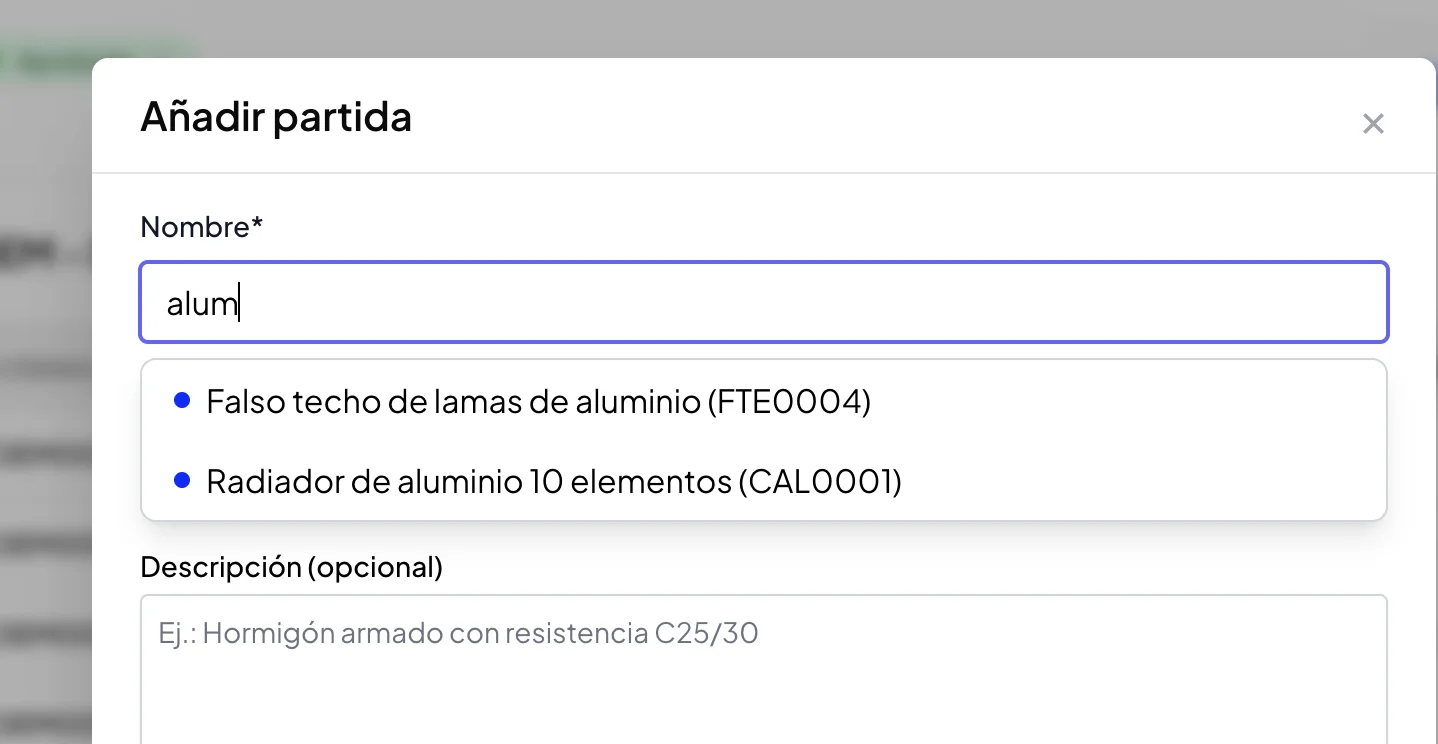
Autocomplete of line items from the price database
The price database builds itself as you work: every item you create is saved automatically. Over time, you'll have your own updated price database ready to use.
- •Instant search: find items by typing any word from the description
- •Always up to date: edit database prices when your costs change
- •Import and export: load your existing database or export it for backup
If you already have a list of items in a spreadsheet, create your free account and you can import it directly into your price database.
Price database scattered across spreadsheets? arcley centralises it all — searchable, always accessible from any device.
Try for freeIf your bottleneck is not just storing line items but turning them into a repeatable quoting workflow, take a look at arcley's construction budget software page to see the shorter commercial overview.
Duplicate existing budgets
Many projects are variations of previous work. Why start from scratch when you already have a similar budget? arcley's duplication feature lets you create new budgets from an existing one, with full control over what gets copied.
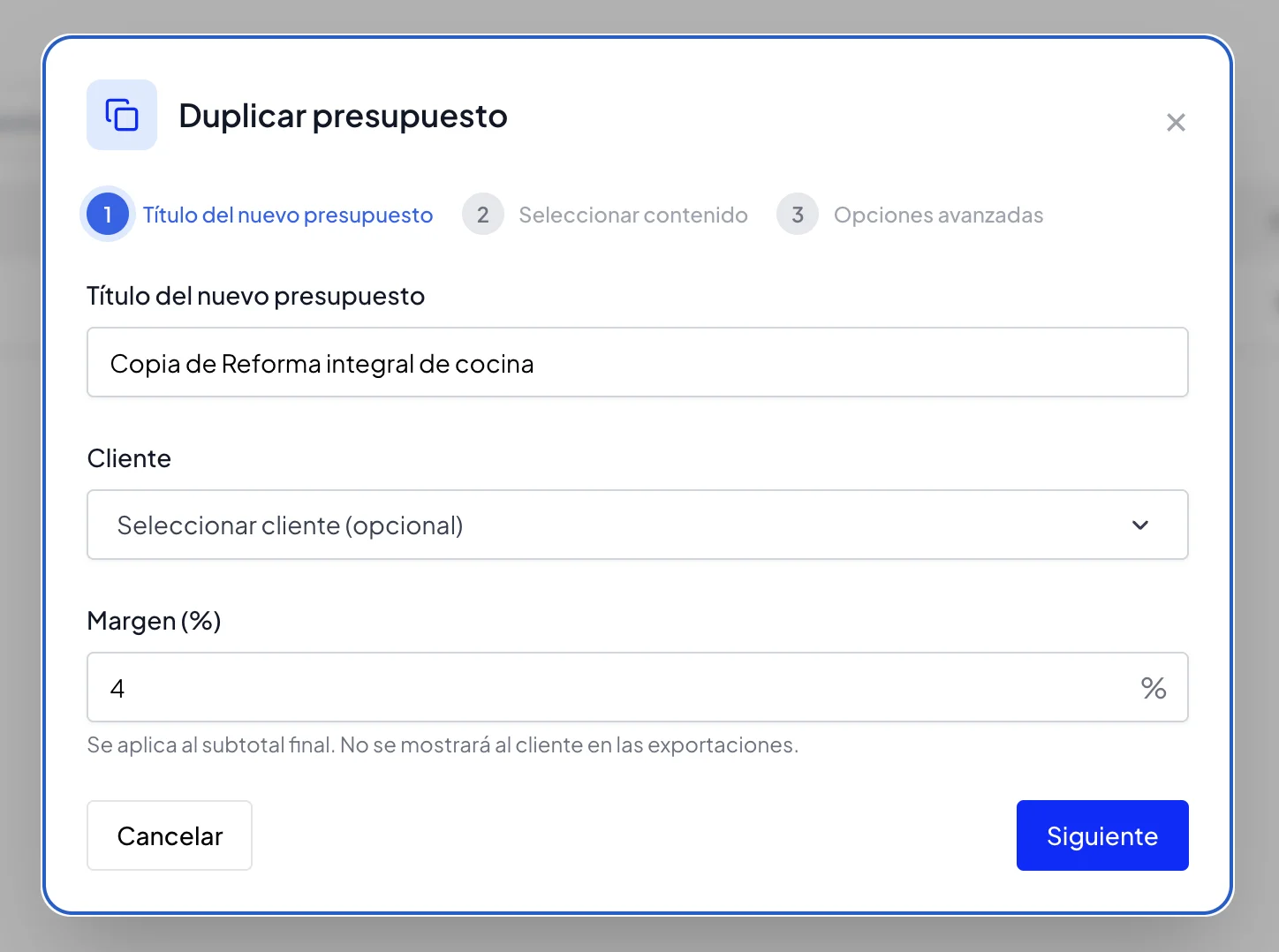
Duplication settings: section selection, client and options
Options when duplicating
- •Select sections and items: choose exactly what content to copy from the original
- •New title and client: assign the duplicate to a different project and client
- •Adjust margin: set a different margin percentage for the new budget
- •Reset quantities: option to zero all quantities for the new project's measurements
- •Include/exclude notes: decide whether to copy internal notes or start fresh
Organise budgets by status
When you're managing several budgets at once, you need to know quickly where each one stands. arcley includes a status system that lets you organise and filter your budgets by their current stage.
| Status | Description |
|---|---|
| Draft | Budget being prepared, not yet sent to client |
| Sent | Already sent to client, awaiting response |
| Approved | Client has accepted the budget |
| Rejected | Client has declined the budget |
| Archived | Closed or historical budget |
You can filter the budget list by status to see, for example, only those awaiting a response (Sent) or the ones you need to finish (Drafts).
Global margin on the budget
Have operating costs you need to apply across all your budgets? arcley lets you set a global margin (for example, 4%) that applies automatically to the budget total.
This margin is calculated on the total cost of line items. Use it to cover overheads, profit margin or any other cost you want to apply proportionally.
If you want a clearer breakdown of what should sit inside overhead rather than inside each line item, this companion guide on indirect costs in construction is the next useful read.
The margin is optional and configurable per budget. You can have budgets with 5% margin, others with 8% and others with no margin, depending on the project or client.
Your margin stays private. Your rates stay competitive.
Configure overheads, profit and VAT per budget. Clients only see the final price.
Integrated client management
arcley includes a CRM to manage your clients without needing an external tool. Each client has a complete record with all the information you need day to day.
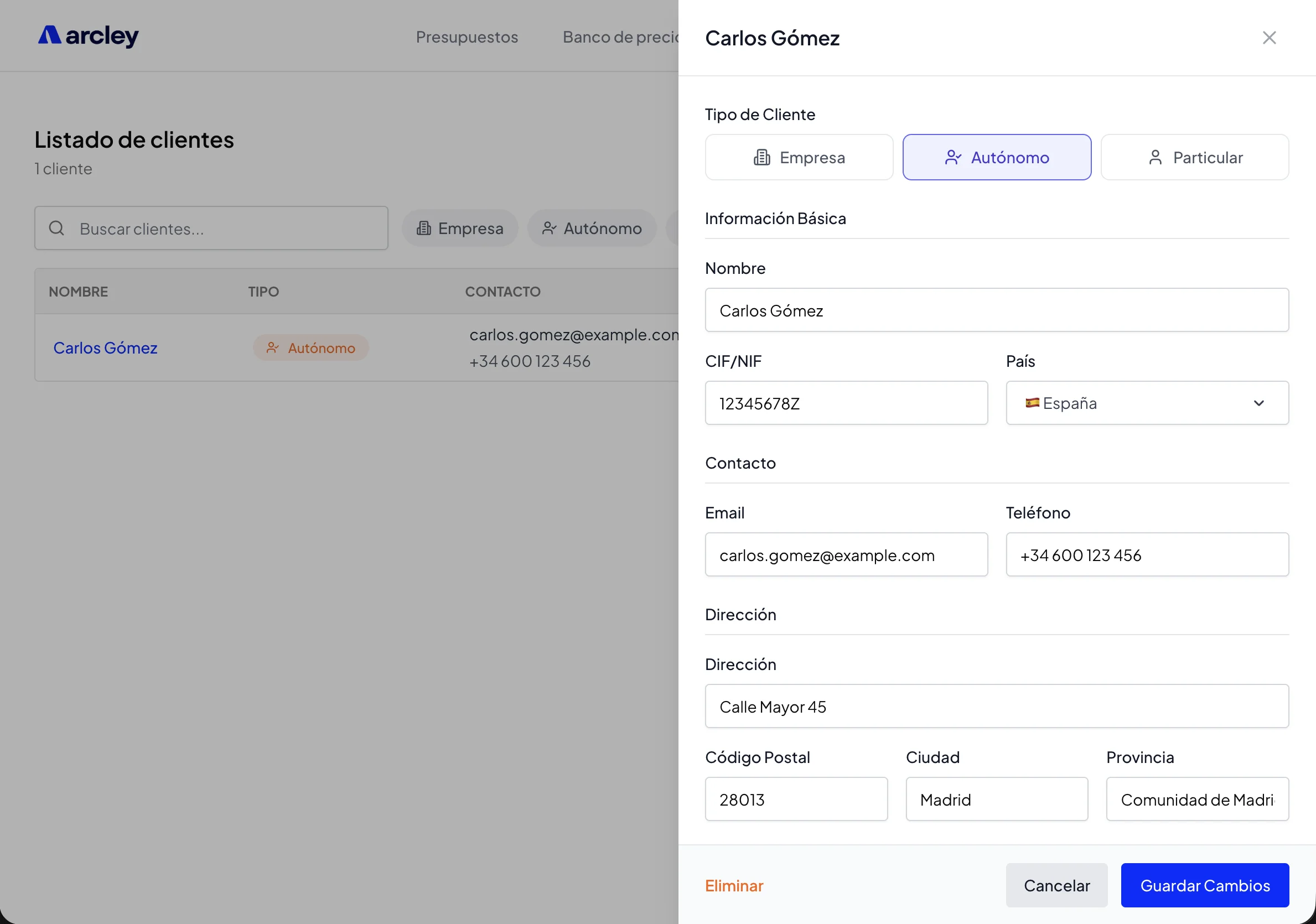
Client record with contact details and follow-up notes
Client data
- •Client type: Company, sole trader or private individual
- •Tax details: Name/company name, tax reference
- •Contact: Phone, email
- •Address: Full address and country
- •Notes: Free text field for relevant information, conversation tracking, client preferences...
The notes field is particularly useful for follow-up: record when you last spoke, what they're interested in, any special preferences... All the information you need to close projects.
When creating a budget, select the client from your list and their details are linked automatically. When exporting the PDF, the client's tax details appear on the cover page.
Available in multiple languages and currencies
arcley is designed for professionals in any country. That's why it's available in multiple languages and supports different currencies.
Available languages
- •English
- •Spanish
- •Portuguese
- •French
- •Italian
- •German
- •Turkish
Supported currencies
Configure your account currency so all budgets are displayed and exported in the currency you need:
- •GBP (Pound sterling)
- •EUR (Euro)
- •USD (US Dollar)
- •CHF (Swiss Franc)
- •CAD (Canadian Dollar)
- •BRL (Brazilian Real)
- •MXN (Mexican Peso)
- •TRY (Turkish Lira)
Plus additional currencies. Language and currency settings are configured in your account settings and apply to all your budgets.
Secure platform and regulatory compliance
Your budgets contain sensitive information: prices, margins, client data. That's why security is a priority at arcley.
- •SOC 2: we meet SOC 2 standards for security, availability and confidentiality
- •GDPR: full compliance with the European General Data Protection Regulation
- •SSL encryption: all communications are encrypted with SSL/TLS certificates
Your data is protected and only you have access to your information. We do not sell or share data with third parties.
Multi-format export
arcley lets you export your budgets in several formats depending on what you need: professional PDF for the client, BC3 for exchange with other software, or Excel/CSV for internal analysis.
| Format | What it's for |
|---|---|
| Professional document to send to the client, with cover page, index and your branding | |
| BC3 | Standard exchange format with Presto, Arquímedes and other measurement software |
| XLSX (Excel) | Spreadsheet with a summary sheet and a detailed breakdown by sections and items |
| CSV | Plain text data for importing into other tools or databases |
PDF: the document your client receives
The PDF is what your client receives. That's why arcley lets you customise every aspect of the document: from your logo to what information to show or hide.
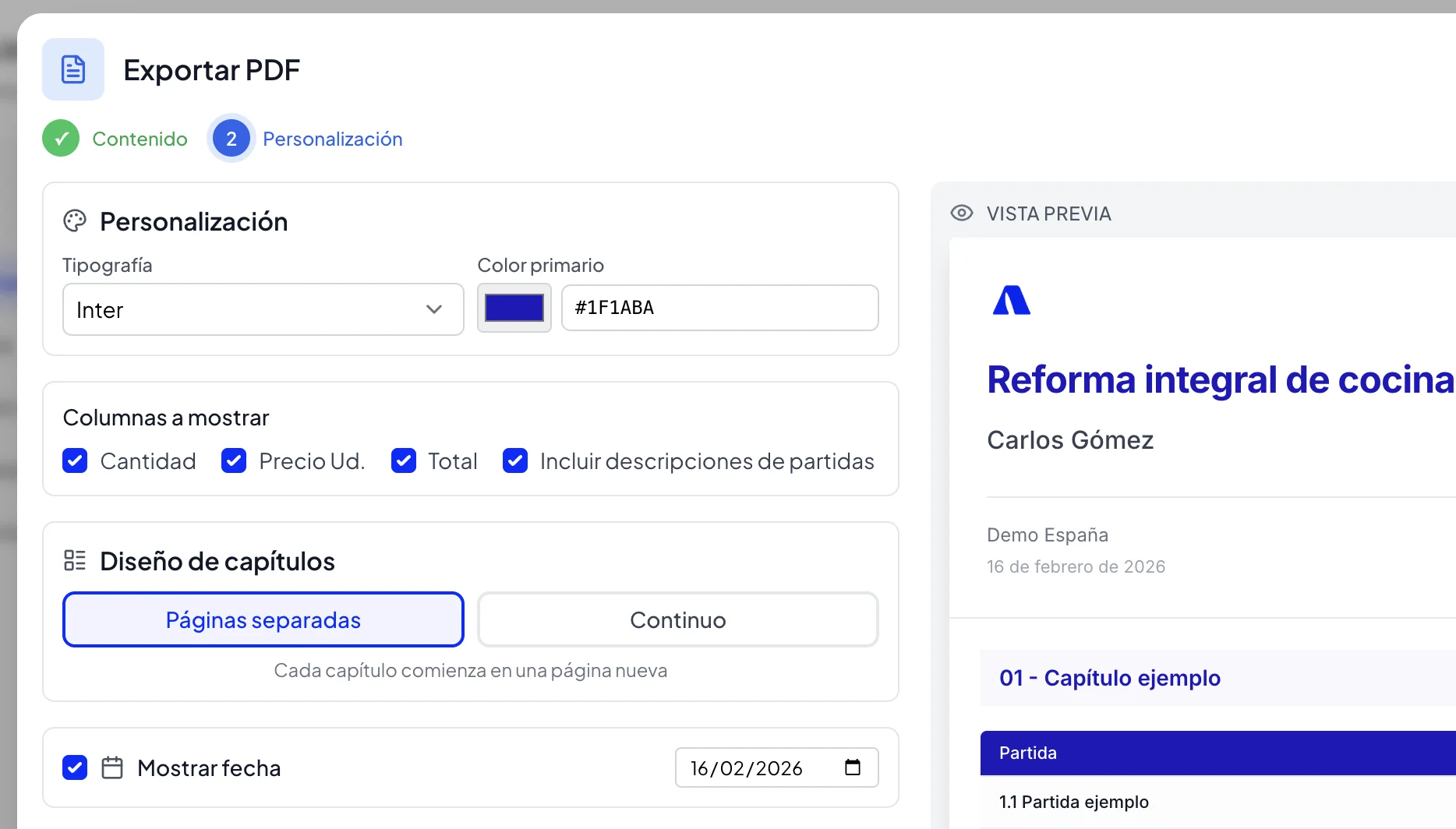
PDF export configuration panel
Document structure
- •Professional cover page: with your logo, company details, client details and project title
- •Automatic index: list of sections with corresponding page number
- •Selectable content: choose which sections and items to include in the PDF
Visual customisation
- •Your logo: upload your company logo for the cover and headers
- •Brand colour: choose the accent colour for the document
- •Typography: several fonts available to match your brand
- •Expiry date: indicate how long the budget is valid for
Information control
You don't always want to show all information to the client. arcley lets you configure what data appears in the PDF:
- •Quantities: show or hide measurements
- •Unit price: show or hide the price per unit
- •Item total: show or hide the amount for each line
- •Descriptions: include or exclude detailed descriptions
Section format
Choose between listing all sections continuously (more compact) or starting each section on a new page (cleaner, more professional presentation for important budgets).
Feature summary
arcley is designed for construction professionals who need to create budgets quickly, accurately and without hassle. Here are the core features:
| Feature | What it solves |
|---|---|
| Sections and line items | Professional structure with automatic totals |
| Simple budgets | No sections — for quick quotes and straightforward jobs |
| Price database | No retyping items, smart autocomplete |
| Duplicate budgets | Reuse previous work with full control |
| Statuses | Know where each budget stands at a glance |
| Global margin | Apply automatic percentage to the total |
| Client management | Basic integrated CRM, no external tools needed |
| Languages and currencies | 7 languages and multiple currencies (GBP, EUR, USD...) |
| Security | SOC 2, GDPR and SSL encryption on all communications |
| Multi-format export | Professional PDF, BC3, Excel and CSV |
If you're tired of spreadsheets, loose documents and inconsistent formats, try arcley free. In 10 minutes you'll have your first professional budget ready to send.
Sources and reference material
If you want to review the budget structure, VAT context and exchange format behind professional construction budgets, these are useful starting points: