
Practical guide
Simple Budget vs Structured Budget [2026]
A plumber who sends a four-section structured estimate for a tap replacement. A project manager who sends a flat, unstructured list for a £90,000 full renovation. Both lose the project for the same reason: the format doesn't match the job.
In this article we cover what separates a simple budget (items only, no sections) from a structured one with sections and line items, when each format is the right call, and the format mistakes that hand projects to your competition even when your price is the same or lower.
If you want to create both formats without switching tools, see the construction budget software page and the free Starter plan before reading the implementation details.
What is a structured budget (sections and line items)
A structured budget organises line items by trade or project phase: Demolition, Brickwork, Electrical, Carpentry... Inside each section, every item has a code, description, unit of measurement, quantity, unit price and amount.
| Section | Line item | Amount |
|---|---|---|
| 01. Demolition | Removal of internal partition wall (12 m²) | £420.00 |
| Rubble removal and skip hire | £180.00 | |
| Section 01 subtotal | £600.00 | |
| 02. Flooring | Supply and fit porcelain tiles 60×60 cm (65 m²) | £1,680.00 |
| Matching skirting board (42 lm) | £210.00 | |
| Section 02 subtotal | £1,890.00 |
Totals roll up at three levels: amount per item, subtotal per section and overall budget total. The client can see how much each phase weighs and decide where to adjust if the total exceeds their budget, without rejecting the whole quote.
This structure also maps to the BC3 (FIEBDC) file format, the standard interchange format for construction budget software and measurement tools.
What is a simple budget
A simple budget is a flat list of line items with no sections grouping them. Code, description, quantity, unit price, amount. No hierarchy. Like a detailed pro-forma invoice.
| Code | Description | Qty | Unit price | Amount |
|---|---|---|---|---|
| ELE0008 | Outdoor LED wall light with motion sensor | 1.00 unit | £89.00 | £89.00 |
| ELE0009 | Concealed conduit installation | 13.00 m | £8.75 | £113.75 |
| ELE0002 | Socket outlet with earth connection | 5.00 unit | £38.75 | £193.75 |
| Total | £396.50 |
No intermediate subtotals because there are no categories to group. The client sees the total and understands what they are buying. Straight to the point.
Still building quotes in a spreadsheet? With arcley you create simple and structured budgets in minutes, with the same price database and professional PDF export.
Try for freeWhen to use each: the practical criterion
The question that solves most cases is this: does the client need to understand the structure of the work, or just know the price? If they just need to know the price, a simple budget is almost always the better option.
More specifically:
Use a structured budget (sections) when:
- •The job involves two or more different trades (electrical + plumbing + painting)
- •The value exceeds £5,000–8,000
- •The client is technical (architect, developer, main contractor) or requires BC3 format
- •You want to negotiate section by section if the client asks for a price reduction
Use a simple budget when:
- •It is a single-trade job (only electrical, only plumbing, only painting)
- •The value is low (under £3,000–5,000)
- •The client is a homeowner who doesn't know what a "section" or "line item" is
- •You need to respond the same day
| Job | Estimated value | Right format |
|---|---|---|
| Plumbing emergency repair | £150–400 | Simple |
| Painting a whole flat | £800–2,000 | Simple |
| Full electrical installation in a flat | £2,500–5,000 | Simple or structured |
| Full bathroom renovation | £4,000–9,000 | Structured |
| Full flat renovation | £30,000–120,000 | Structured (required) |
| New residential build | £150,000+ | Structured (required) |
Two formats, one tool
With arcley you create simple and structured budgets from the same account. Same price database, same professional PDF export.
The mistake that costs the most projects: format mismatch
It is not a pricing problem. It is a readability problem.
- •❌ BAD: A structured, sectioned estimate for a plumbing repair. The homeowner opens a 5-page PDF with technical language, feels overwhelmed and calls the next person on the list.
- •✅ GOOD: A simple budget with 4 lines and £320. The client understands it in ten seconds and replies: "Perfect, when can you come?"
Same job, same price. The simple format closes the work; the complex format kills it.
The error in the opposite direction costs just as much:
- •❌ BAD: A flat, unsectioned list of 40 items for a £75,000 renovation. The client's architect rejects it immediately for lack of technical rigour.
- •✅ GOOD: Eight sections with subtotals where the client can see that Electrical weighs £22,000 and can request a reduction in that section without touching the rest.
How to create both in arcley
arcley supports both formats with no extra configuration. The price database and export options are the same in both cases.
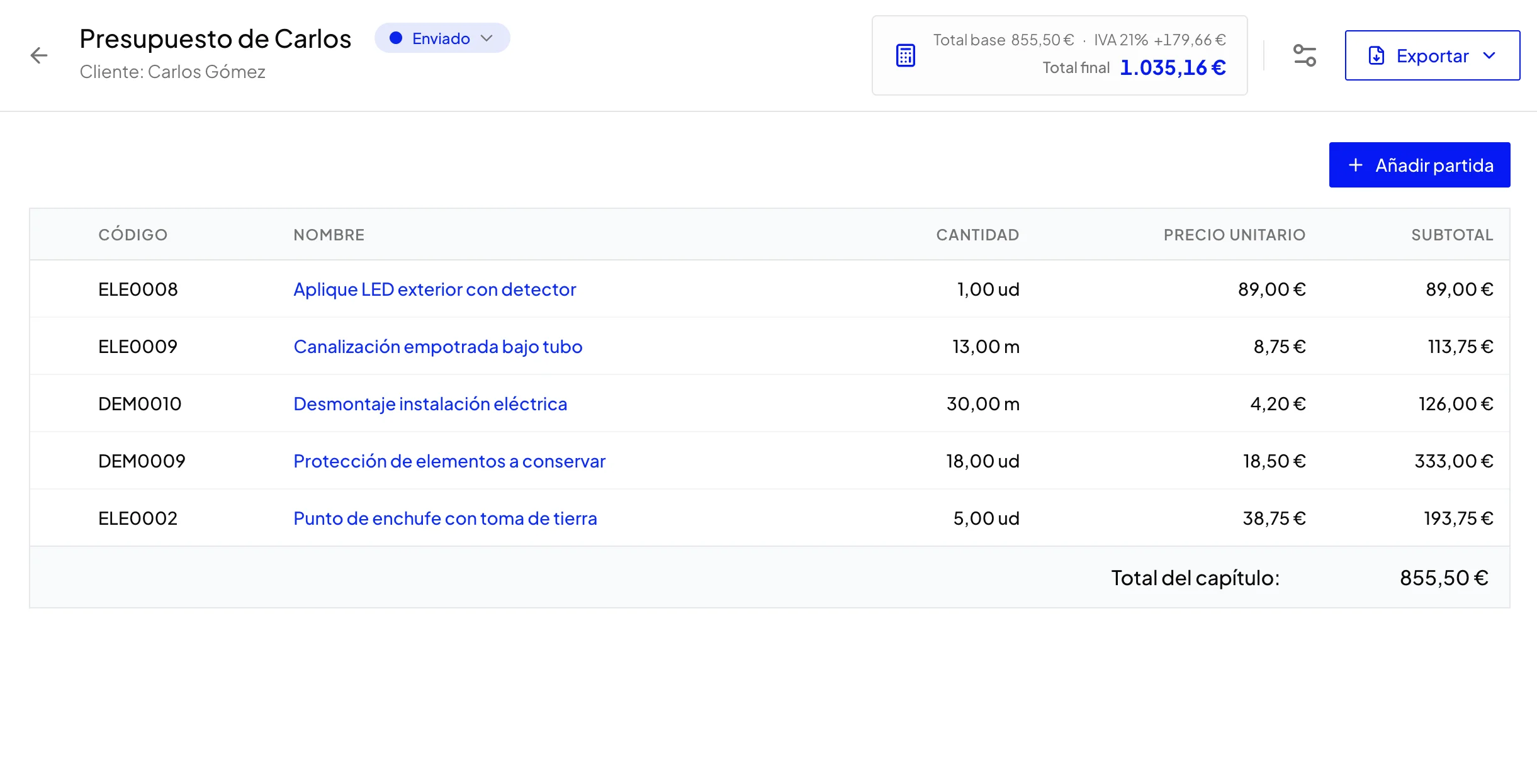
Structured budget: create the budget, add a section ("Demolition", "Brickwork"...), add items inside it. Repeat for each section. arcley calculates subtotals automatically.
Simple budget: create the budget and add items directly, with no sections. Price database autocomplete works the same as in structured budgets.
In both cases you can apply a margin, configure VAT and export to PDF, Excel or CSV. BC3 export is only available for structured budgets, as the FIEBDC standard requires that hierarchical section structure.
Conclusion
If the client needs to understand the structure of the work: sections. If they just need to know the price: simple. With arcley, both formats are available from the same account and the same price database.
Sources and reference material
If you want to review the standards behind structured budgets and exchange-ready hierarchy, these are useful starting points: